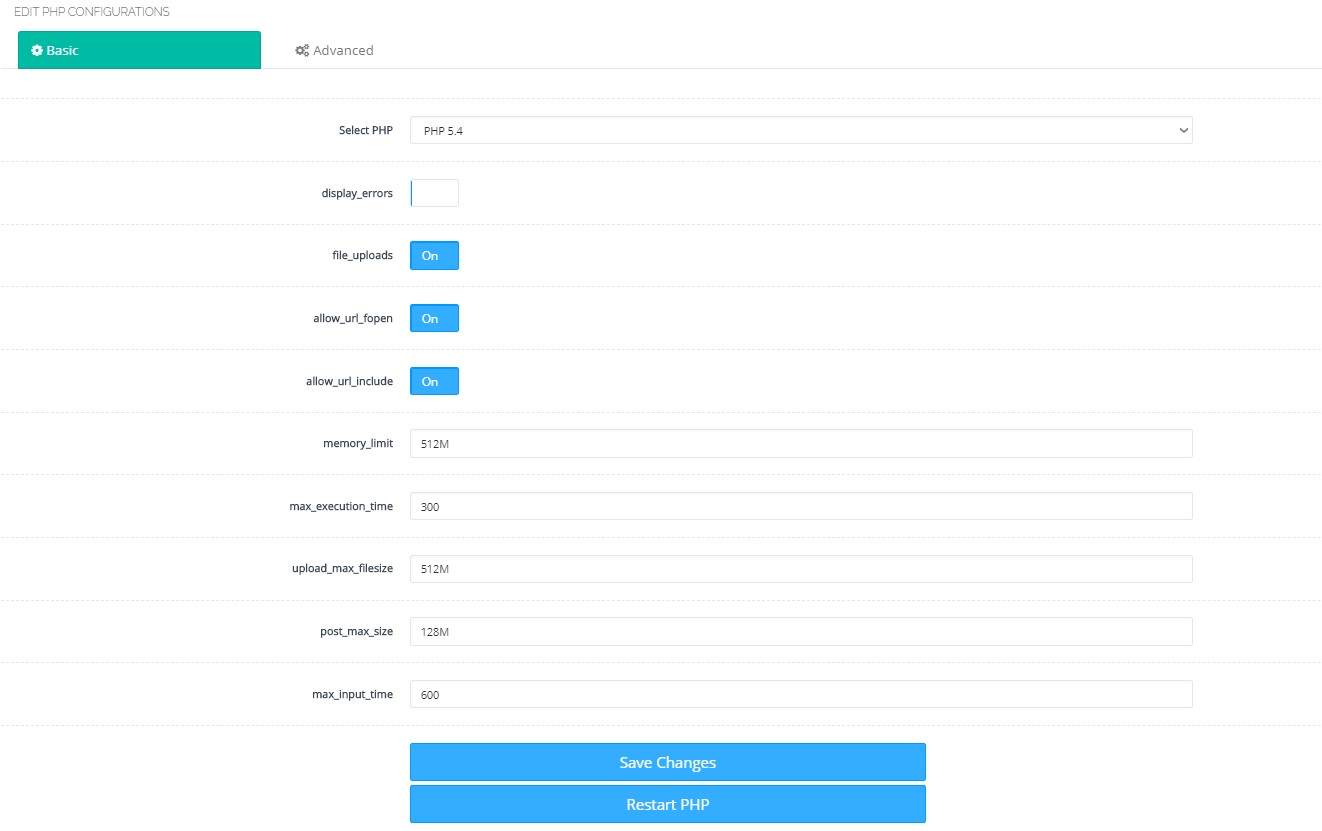
The operations will be performed in the PHP/Edit PHP Configs section after entering the Cyberpanel management panel. First, in the Basic section, apply and save for all PHP versions one by one. Make these settings assuming you are not selling hosting and are using the server yourself. I apply these on my personal servers where I have my own sites. Apply accordingly.
allow_url_include will be enabled.
memory_limit 512M
max_execution_time 300
upload_max_filesize 512M
post_max_size 128M (If desired, 512M can be given, same as upload max size).
max_input_time 600
will be updated as. I am also adding a photo below.
In the Advanced section, things to be done for all PHP versions. I am changing a total of 4 values.
1. Value:
short_open_tag = Off
those that are
short_open_tag = On
will be done
2. Value:
;date.timezone =
where it is, remove the leading semicolon
date.timezone = Europe\Istanbul
will be done.
3. Value:
log_errors = On
part
log_errors = Off
will be done.
4. Value:
disable_functions =
part
disable_functions = exec,system,passthru,shell_exec,proc_close,proc_open,dl,popen,show_source,posix_kill,posix_mkfifo,posix_getpwuid,posix_setpgid,posix_setsid,posix_setuid,posix_setgid,posix_seteuid,posix_setegid,posix_uname
will be done.
Note: If you want to edit php.ini in bulk, you can also check my article Cyberpanel php.ini dosyaları nerede?.